In this article, you'll learn how to create a referral form that lets people from your school tell your Admissions staff about students who might be interested in hearing from your school. This form will let you create a new person—complete with contact info—based on the entries from the response, giving you the basics you need to reach out to these prospective students.
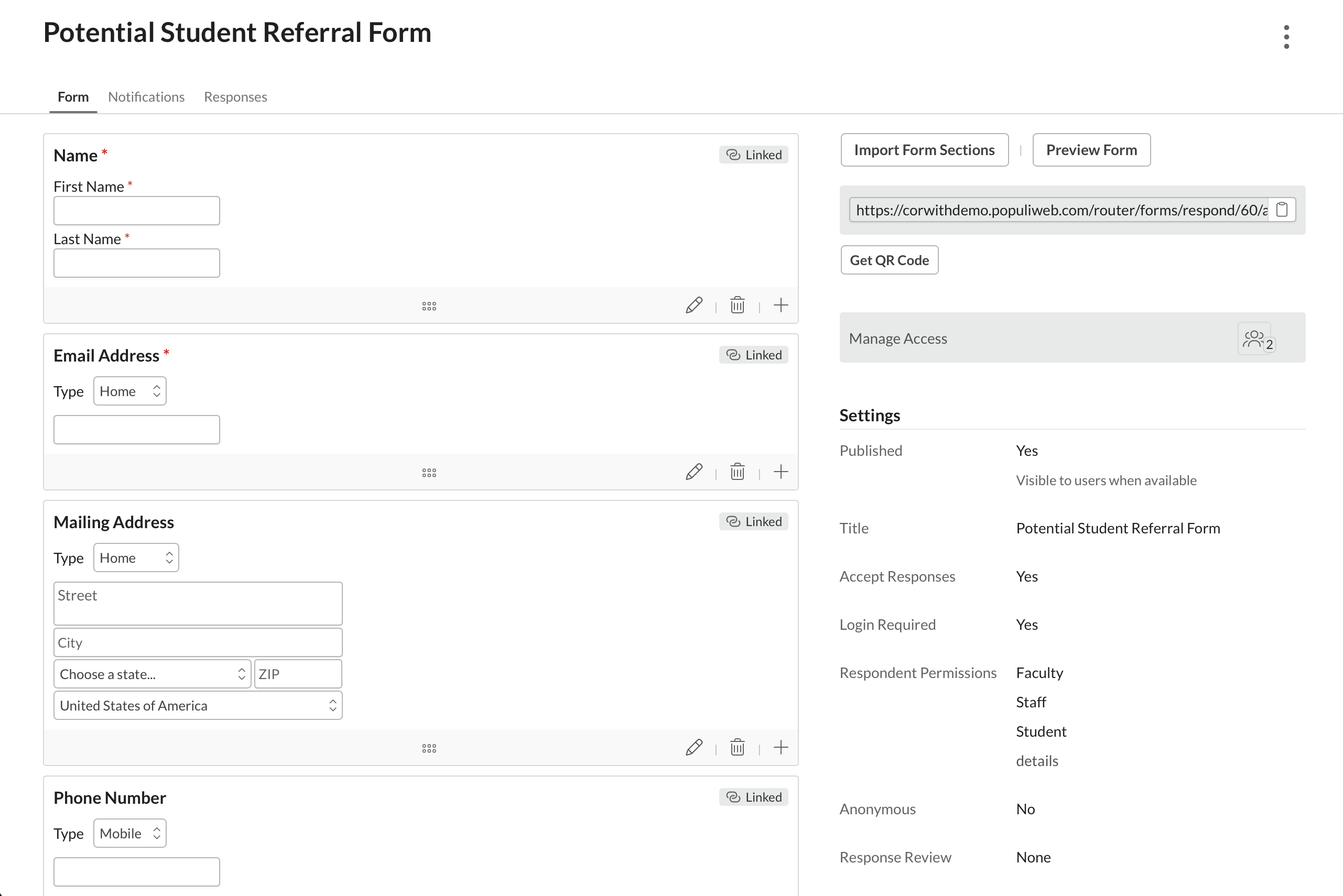
Form Settings
Here are the form settings (presented somewhat out of order) that you'll want to pay particular attention to:
- Respondent Permissions: Set it up so that students (and others, if desired) can "submit unlinked responses".
- Login Required: Presumably, you only want to hear from people at your school, so this provides the necessary gatekeeping. It will also give you a record of who submitted the referral.
- Response Review: You have some latitude here, but None will result in the fewest clicks for your admissions staff. You'll be using the linked fields described below to create a new person, and None will import all the linked fields directly to the new person's profile as soon as you add them. Review, on the other hand, would require that you accept each linked field individually. That'll still work, but no one will complain about needing fewer clicks when you choose None.
- Manage Access: Make sure that Admissions Admins can "Manage form and responses"; regular Admissions users could probably do fine with "View form and manage responses". Whatever you do, you want to make sure everyone in your office can process these responses.
- Published: Obviously, you want to publish the form. But for added convenience, set the form to Listed (when available) so it's available to students via Forms > Dashboard; otherwise, you'll have to use the various manual methods to request a form response.
- Notifications: You'll likely want a Form Response Submitted notification that emails the primary addresses of one or more of your admissions staff. (And if you don't list the form, make sure to add a Form Response Requested notification.)
Design
You have lots of latitude with form design. But since the goal is to get enough information about a prospective student to initiate meaningful contact, here are some things to keep in mind:
-
Linked Fields: Since students can submit unlinked responses (see above), the linked fields will be used to create a new person with contact info. You should add linked fields for Name, Email, Phone, and Address—Name and Email should be set to required. Gender might be a good one to include at this point as well.
- You could also create a custom Admissions field called, say, Referral Comment, and then add it as a linked field as well. When you add the person to Populi, this will import over to Profile > Admissions and will provide you with some notion of why this student might be a good fit at your school.
- Don't include: Linked fields for any sort of academic information (degree, term, etc.). The students making this referral probably can't provide you with those details!
How it'll work
Here's how a form thus designed could work...
- Phil "Philly" Thompson talks to his cousin on his father's side, Nora Thompson, and thinks she'd be a good fit at your school. He logs in to Populi, finds the form in Forms > Dashboard, and bashes the Fill Out This Form button with gusto.
- Philly tells you what he knows about Nora—name, contact info, and a few words about why she might be worth your while. With panache, he smashes the Submit button.
- Your admissions staff all get the notification email about the response. They all race to their computers to process it. The first one to it links it to a person by adding Nora as a new person. With élan.
- An unseen rush of electrons ensues and Nora's profile, complete with contact info and a referral comment, surges into being. That speedy Admissions user visits it and begins plotting the first contact. Maybe he'll add Lead Info (he should definitely do that). Maybe he'll start an official inquiry. Maybe he'll reach out... later today. Whatever the case, Nora's gonna have some kinda chat with your school.
0 Comments