The Financial Value Transparency/Gainful Employment report (what a mouthful—it's just FVT/GE from here on out) helps your school submit data to the Department of Education (ED) to help “...the Department [assess] whether career programs meet the statutory requirement of preparing students for gainful employment in a recognized occupation using two separate and independent metrics... a debt-to-earnings rate and a new earnings premium test.”
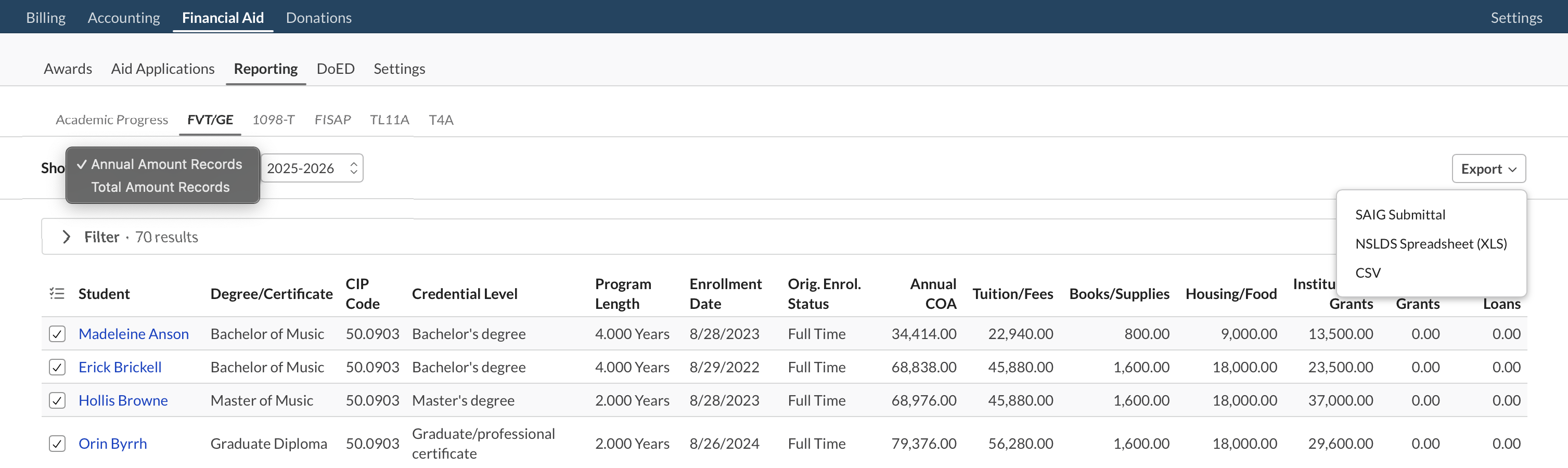
The report presents the records required for the Annual Amount Records (AA) and Total Amount Records (TA). The data are derived from student aid applications and the record of invoiced charges for relevant tuition and fees. Owing to certain gray areas in the guidelines, the charge types and the time range for those charges err on the generous side; the FVT/GE guidelines are pretty broad at various points, so the data shown in Populi could be considered a "rough draft" for what you end up submitting to SAIG or NSLDS. Your job is to review these records (Profile > Financial > History is a good reference) and make any required corrections to individual students before exporting for submittal.
- Toggle between the reports for Student Annual Submittal and Student Total Submittal, and make sure to pick the correct Aid Year from the drop-down.
- On the TA view, click to view a breakdown of the individual items used to tally the amounts shown on the student's row in the report.
- If you see next to a student's name, that indicates that required information is missing from his records. Such students are worthy of a thorough review.
- On the AA, the FVT/GE guidelines request "Residency Tuition Status by State or District". Populi does not track the data required for this field so it is populated with "OS" by default (as recommended by the guidelines).
- On the TA, the guidelines request "Institutional Debt Amount". Populi does not track the data required for this field so it is populated with "$0" by default.
You have three export options:
- SAIG Submittal File: This produces a CSV that matches the specifications for SAIG transmission: dates, lengths, and amounts are not easily read by a human! Only export this after you have performed your review. It will exclude any records marked in Populi with .
- NSLDS Spreadsheet: This produces an XLS file formatted according to the NSLDS template. You can easily review and modify this file before uploading to NSLDS.
- CSV: This produces a human-readable CSV file according to the data as it is presented in Populi's FVT/GE report. It does not match any submission format and cannot be used with SAIG or NSLDS.
0 Comments