Support hours are 6 AM to 5 PM Pacific Time, Monday through Friday (excluding major holidays).
If you need help using Populi or would like to report a problem, get a hold of Populi Support. Here's how we can help you...
Accessing help in Populi
All of our support resources (except for phone support) can be accessed when you click in the upper right of the screen. Select the option you're after; if the resource is located within our main support system you'll be logged into it once you click.
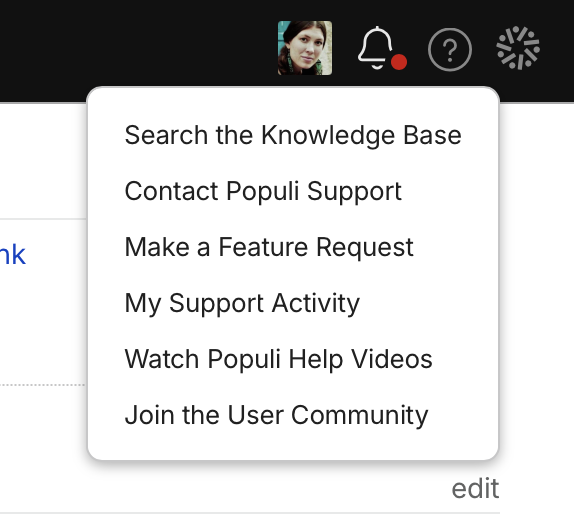
Knowledge Base
The Populi Knowledge Base includes tutorials, how-to's, reference articles, and getting-started guides for every area of Populi for every kind of user—students, faculty, and staff. See below for an overview of what's covered in it.
The Populi YouTube Channel
We have hundreds of videos covering all kinds of topics on our YouTube channel. A new video comes out more or less every week on Fridays.
Support requests
If you need help with a particular matter, write us a support request via email or by using this simple form. You can ask us how to use Populi, get a second pair of eyes on something you don't understand, find help with how to use Populi to handle a situation at your school... and, of course, to report any issues with the software!
- You can update your requests using email or by accessing your open requests in this help system.
- Requests submitted during regular support hours can generally expect a reply within an hour or two. Outside of regular support hours, replies typically take a bit longer.
Release notes
We release features, updates, improvements... and bugfixes... every week. These are catalogued in our weekly Release Notes. If you click Follow on that linked page, you'll get them emailed to you whenever they're published.
Focus Sessions
Focus Sessions are smaller, more in-depth trainings that allow new Populi users from different schools to learn and ask questions around particular topics. Trainings take place in a video meeting and last one hour. We rotate through seven topics every four weeks or so, so if you miss one, it'll usually come back around within a month. The aforementioned Release Notes take pains to mention any upcoming Focus Sessions (another reason to subscribe to the Release Notes!).
Feature requests
Do you have an idea for how to make Populi better? Submit a Feature Request. This puts your idea in front of not only us but all of our users. You can also weigh in on ideas submitted by other users and help us identify features that would benefit the most people.
User forum: the Populi Discord server
Populi's user community can be found on our Discord Server. It's a place where Populi users communicate directly with one another—asking questions, sharing tips and workflows, and getting ideas about how to use Populi to run their schools the best way possible. It's open to Staff and Faculty (sorry, students!); see the article linked above to learn how to request an invitation.
Phone support
We also offer phone support for staff and faculty (not students and other users) during regular support hours:
- Call 877-476-7854.
- If you call outside support hours, you can leave a voicemail.
- Some issues may require more extensive troubleshooting; in such cases, we may open a support ticket and address your issue that way.
New to Populi?
Scan the list below to find the sections of the Knowledge Base that cover the areas you'll be working in:
- The Basics include basic navigation, Home, Email, Calendar, and Files.
- Staff topics include adding people, organizations, communications, and campus life.
- Academics covers all academic functions in Populi.
- Admissions topics include communicating with inquiries and leads, setting up and processing applications, and accepting students.
- Financial topics include student billing, accounting, online payments, and reporting—and Donations. You may also want to take a look at Campus Store and Campus Life, which both require some setup on the financial side.
- Financial Aid covers setting up, disbursing, and refunding financial aid awards, plus aid applications and reporting.
- Faculty articles describe how to manage individual courses (assignments, tests, grades, attendance, etc.). Faculty advisors might also be interested in the section covering Advising.
- Library covers all the functions in Populi Library—including catalog management, resource loans, patron management, search, and more.
- Campus Store instructs you how to set up Populi Campus Store and manage day-to-day orders, sales, inventory management, and reporting.
- Student tutorials cover what students can access and do, including interacting with courses, viewing their profiles, and making payments.
- Developer includes guides to Populi's various integrations and other capabilities. You might also be interested in the API documentation.
- Release Notes are published every Friday with details about the previous week's Populi updates.
0 Comments